B2B data enrichment adds available company or contact information to an existing record. Before outreach, prioritize the details that establish the right company, a relevant contact role, and a factual reason to write. A fuller profile does not establish buying intent; leave unsupported needs and nonessential fields unknown.

Table of contents
What does B2B data enrichment add to a record?
Your prospect list has a company name, a website, and an empty contact column. What should you add next? The answer depends on what is preventing a useful decision. You might need to establish whether the company distributes your product category. You might already know that and need a relevant role. Filling a revenue field solves neither problem unless revenue is part of your selection rule.
B2B data enrichment supplements a record with company-level or person-level attributes. HubSpot's enrichment documentation lists company fields such as industry, description, domain, and employee range, alongside contact fields such as job title and employment role. Its individual-record workflow lets you inspect current values and select properties to add. These documented options, checked on November 3, 2026, illustrate why enrichment can be a selective task.
Establish the match before using the added details
Where do those additional values come from? People Data Labs describes its Person Enrichment API as matching a person one-to-one against its dataset and returning available profile fields. That overview, also checked on November 3, 2026, describes record matching, not whether the person needs your product. Before using the returned details, check that the company identity and employment context belong to the person you intend to contact.
For HubSpot specifically, contact enrichment requires a business email, while company enrichment requires a company domain. Records are enriched only when relevant property values are available. Don't interpret an empty result as proof that a company does not exist or that nobody there is relevant. It tells you that this enrichment attempt did not supply the information you need.
What can a fuller profile still leave unanswered?
Suppose a record now has a website, industry, employee range, and a named manager. You can still be missing the fact that matters: whether this business serves the market you sell into. A field can be present without answering your question. Read the company description and supporting material before treating an industry label as a useful account-selection rule.
What if the new value contradicts something your team already checked? Keep the disagreement visible while you resolve it. A broad industry label and a narrower product catalogue may describe different aspects of the same business. A different domain or employer may indicate a more serious mismatch. Ask which source refers to the entity and time period relevant to your planned message, and record why you kept or rejected the value.
Protect a correction you have already made
HubSpot's documentation makes overwrite behavior explicit. Automatic enrichment fills blank properties without replacing values entered by a user or another system. Manual enrichment can fill blanks or overwrite values. Continuous enrichment updates previously enriched values, but stops on a property edited by a user or another system. Those distinctions, checked on November 3, 2026, belong to HubSpot; verify your own tool's behavior before importing updates.
The practical question is whether an enrichment run preserves a correction you trust. HubSpot also documents enrichment events and property history on the record timeline. Use the history your system provides to investigate changes, while remembering that a timestamp records an update, not an independent guarantee that the value is correct.
Which company and contact details deserve attention first?
Start with identity: the company name and domain you are using must refer to the intended account. Then examine business fit: what does the company sell or do, and does that connect to your offer? Move to the contact's role once you can explain that connection. This order is a proposed research priority for initial outreach, not a universal enrichment schema.
Keep the intended use next to each requested field. A domain helps resolve identity. A product description can support a relevance hypothesis. An employment role helps you assess whether the subject belongs in that person's work. Employee range or revenue can wait when neither affects your targeting criteria or the substance of the message. Another team may need those fields immediately because it has a size-based territory rule.
Choose the tool after identifying that gap. A CRM enrichment feature can add selected properties to records; a person-enrichment API matches a known person against a dataset. A company-search workflow starts earlier, with candidate discovery. These are different starting points. Ask what identifiers the service needs, what it can return, and whether the returned information answers your missing question before connecting it to a larger workflow.
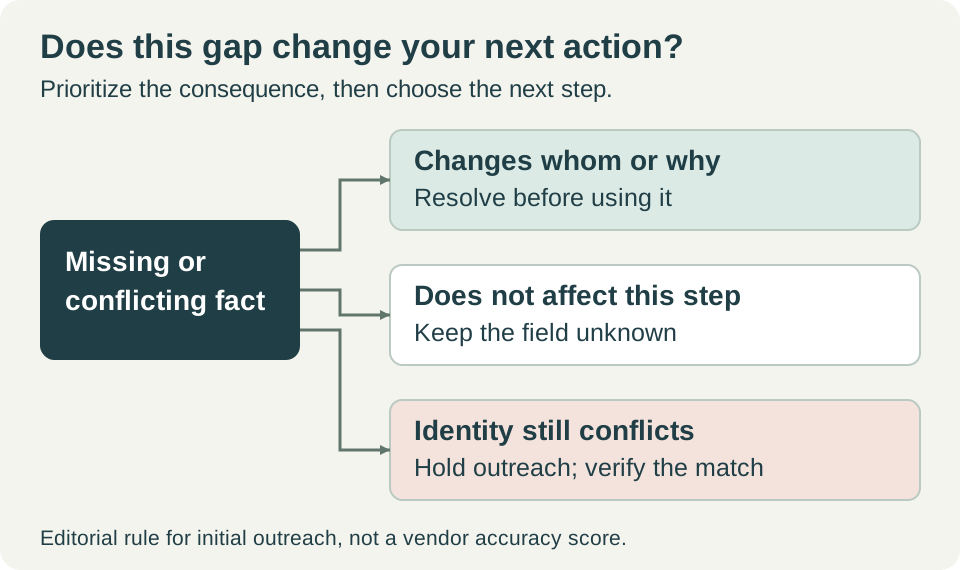
Use the next action to prioritize a missing field; a conflicting identity needs resolution before outreach.
How is enriched data different from sales qualification?
Enrichment supplies attributes about a record. Qualification asks whether an account or conversation meets your team's criteria for the next sales stage. A job title can help you choose a recipient, but it cannot establish budget, purchasing authority, or an active project. Keep the evidence needed for each decision distinct so an added contact field does not silently become a claim about readiness to buy.
Try reading each note as a sentence you might put in an email. 'Your catalogue includes industrial valves' reports a checkable observation. 'Our valve range may fit your distribution portfolio' is a hypothesis you can ask about. 'You need a new valve supplier this quarter' asserts a need and deadline that those facts do not establish. More fluent copy cannot supply the missing evidence.
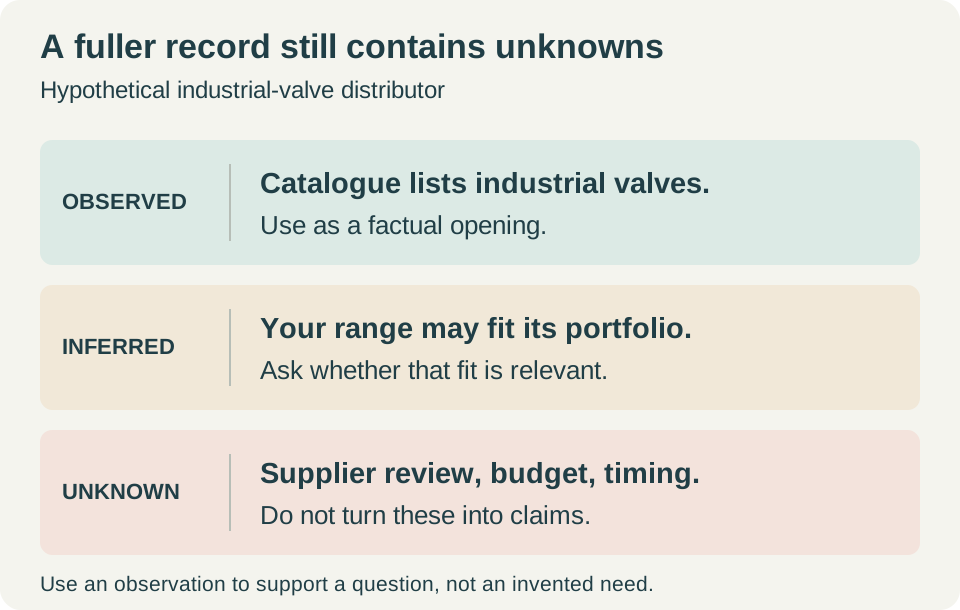
Illustrative account notes: catalogue content can justify a question about fit, not an assertion of current demand.
When is the profile sufficient? For an initial relevance question, you need a defensible account match, a plausible recipient role, and an opening grounded in what you actually know. You may still lack a budget or buying timeline. Ask about those later if they become relevant. If the uncertainty concerns which company or employer you have matched, pause instead: that uncertainty can invalidate the entire message.
Apply the distinction to a distributor prospect
Consider a hypothetical industrial-valve exporter reviewing a distributor candidate. Assume the candidate's website lists industrial valves, the domain is consistent across the materials you have checked, and an available contact has a product-category role. You have no evidence of a supplier review or an upcoming order. Under those assumptions, the research supports a question about product fit. It does not support a claim that the distributor is looking to switch suppliers.
OKKI Go's official use cases, checked on November 3, 2026, describe a way to develop that account context: you provide product information, buyer types, target markets, and exclusions; the agent returns company candidates with business context. You review the candidates and confirm which to unlock, then inspect available company contact emails. The result is material for your account and contact decisions. It is not a guarantee that every field or address is accurate.
For the hypothetical exporter, the next draft could ask whether the recipient handles this product category and whether an introduction to the range would be useful. That wording exposes the uncertainty instead of disguising it. OKKI Go documents drafting from company context and supplied product materials, followed by confirmation of recipients, subject, and body before sending. The cited workflow does not establish bulk CRM cleansing or automatic synchronization of enriched records.
Before approving any message, inspect the recipient and the factual opening separately. An available email address is not evidence that the named person owns the decision, nor does an enriched record demonstrate successful delivery. If you cannot resolve a material identity conflict, hold that record. If only a nonessential field is missing, keep it blank and proceed with a narrowly framed question, subject to your normal sending and suppression checks.
Before requesting another field, name the decision it would change. If you cannot name one, keep the gap visible and spend the research effort on the account or contact uncertainty that could alter your next action. What would you write differently if that missing value arrived?
Frequently asked questions
What is B2B data enrichment?
B2B data enrichment adds available information to a company or contact record, such as business descriptions, domains, job titles, or employment roles. The service must match the record to relevant data. The added attributes support research, but they do not by themselves establish a purchasing need.
What information do I need before enriching a company or contact?
Requirements depend on the service. HubSpot documents a business email for contact enrichment and a company domain for company enrichment. Check your provider’s identifiers before running a batch, and inspect ambiguous matches before using the returned details in outreach.
Will enrichment overwrite details my team has corrected?
Check the specific enrichment mode. HubSpot distinguishes automatic filling of blanks, manual filling or overwriting, and continuous updates to previously enriched values. It also states that continuous enrichment stops on a property edited by a user or another system. Other products may behave differently.
When should I stop enriching a prospect record?
For initial outreach, stop when you can identify the intended account, explain a plausible role match, and write a factual relevance question. Leave nonessential unknowns blank. Continue investigating when the missing or conflicting detail would change the recipient, account selection, or claim in your message.